
Explainers
Understanding Industrial 3D Visualization in 2026
Industrial 3D visualization starts from engineering CAD and has to show scale, mechanism, and configuration, so always-on programs usually beat one-off renders.
Mainstay Digital · · 7 min read
Short answer
Industrial 3D visualization starts from engineering CAD and has to show scale, internal mechanism, and configuration to expert buyers on long sales cycles. Consumer product 3D and furniture room visualizers solve a smaller problem: helping one shopper picture one item in one room. For manufacturing marketing teams, an always-on program usually beats a one-off render project because a single 3D master keeps feeding new shows, SKUs, and sales requests.
Industrial 3D visualization differs from consumer and furniture visualization in 4 ways that matter. The source is engineering CAD, the product is huge or sealed or both, the buyer is an expert, and the decision often runs for months. A sofa visualizer has to look good in a living room, and a palletizer visualizer has to match the drawing.
How is industrial 3D different from consumer product 3D or furniture room visualizers?
Industrial 3D starts from engineering CAD, shows machines at true scale with their internal mechanisms exposed, and serves expert buyers who decide over months. Consumer product 3D and furniture room visualizers start from catalog models and serve one shopper in one session.
The consumer product 3D comparison runs row by row in this table.
| Industrial equipment | Consumer product or furniture visualizer | |
|---|---|---|
| Source file | Engineering CAD (STEP, NX, Creo, SolidWorks) | Usually modeled from the catalog |
| Accuracy bar | Matches the drawing, down to guarding and axis count | Looks right in a photo |
| Scale | Often bigger than the booth, sometimes trailer-sized | Fits a room, a table, or a hand |
| What the buyer needs to see | Internal mechanism, service access, alternate configurations | Color, finish, fit |
| Who's looking | Plant engineers, purchasing leads, executives, dealers | One shopper |
| Time to decision | Often months, with a committee | Usually one person in one session |
| Where it runs | Website, booth iPad, sales calls, RFPs | Product page, shopping app |
| Useful life | Years, updated as engineering changes | Tied to the catalog |
Every row pushes the same way: toward accuracy, toward mechanism, and toward content that gets reused.
Why does industrial 3D visualization depend on CAD-derived accuracy?
Industrial product visualization turns engineering CAD into renders, video, AR, and interactive 3D that explain a machine to buyers. Those buyers read a machine the way they read a drawing, so someone evaluating a 4-axis palletizing robot will catch a wrong axis count or a missing guard in seconds.
A STEP, NX, Creo, or SolidWorks file carries the real geometry. A 3D master rebuilt from it carries the same bolts, guards, and envelope into every render, video, and AR placement.
Raw CAD is accurate and still needs work before it sells anything. Materials, lighting, camera moves, and a story all get bolted on during production (and pulling senior engineers off the roadmap to do that is the most expensive 3D a company can make).
A model styled for a catalog can look great and still mislead. When the guarding on screen differs from the guarding on the floor, the sales engineer ends up correcting marketing in the middle of a quote.
How do scale and hidden mechanisms change the job?
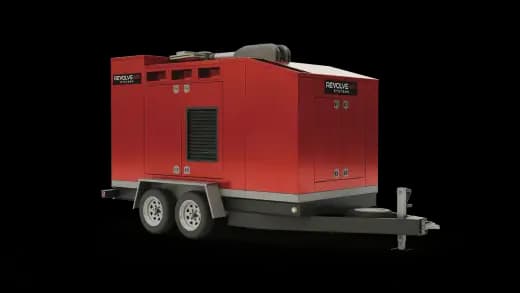
Capital equipment rarely fits where the buyer is. Tidel's TR400 cash recycler is a thousand-pound machine that can't ship to every show, and MES Fire's RevolveAir fill station is trailer-sized.
Web AR handles the scale problem. A buyer scans a QR code and the machine lands in their own space at true scale, from a phone browser, with no app. MES Fire's experience averaged 7+ minute sessions across 5 countries and eliminated shipping costs.
Hotspots and interactive 3D handle the sealed parts. Labeled callouts walk a buyer through the mechanism without a teardown, and the same model can show alternate configurations of one base machine.
A room visualizer does the placement half of that job well. Industrial work adds the other half, which is showing what's inside.
Who's buying, and how long does the decision take?
An industrial deal often pulls in a plant engineer, a purchasing lead, and an executive, each with a different question about the same machine. Many of them never walk your booth.
Yaskawa Robotics ran into exactly that. A Web AR build of its PL-Series robot reached C-suite buyers who never walked the show floor, and the project reported 66% higher engagement than traditional methods, 30% better lead quality, and a 5:1 return on investment.
Long cycles reward content that keeps working while the sales team is busy elsewhere. In the Boon Edam project, an interactive 3D ecosystem produced 3 to 4x longer sessions, 35% lower cost per demo, and sales cycles 2 to 3 weeks faster.
Always-on 3D or one-off render projects: which is better?
For most manufacturing marketing teams, always-on wins. Always-on 3D content is a persistent library of 3D assets that keeps producing and stays published.
The slow, costly step is building the 3D master from CAD, and an always-on program pays that cost once per product. Teams that treat every launch as a fresh project pay the setup cost again each time. Here's how the two models compare on the points that matter:
- Calendar: shows, launches, dealer requests, and RFPs arrive all year. A program keeps pace, while a project needs a new quote and timeline for each one.
- Reuse: 1 master feeds stills, video, AR, and interactive 3D. A one-off render usually stops at the asset it was ordered for.
- Freshness: when the configuration changes, a program updates the model. A one-off asset ages the day the product does.
- Budget shape: a subscription gives finance the same number every quarter. Separate projects arrive as separate bids.
One-off 3D rendering projects still have a place. A single flagship hero film for one product, with nothing planned after it, is a fair job for a specialist studio, and so is a one-time event with a hard end date.
What does an always-on program look like day to day?
Mainstay One is Mainstay Digital's version: a subscription that keeps produced 3D content coming from your CAD. You upload a STEP file, answer 3 to 7 questions, and a first draft arrives in weeks. Then you revise as many times as you need.
Turnarounds run 1 to 2 weeks for product stills, 3 to 4 weeks for Web AR, 4 to 6 weeks for product videos, and 4 to 8 weeks for interactive 3D. Plans start at $2,995 a month, with a one-time $2,500 onboarding fee and 30 days notice to cancel.
Mainstay has delivered 1,250+ assets to 150+ industrial brands, including Kawasaki Robotics, KUKA, Baxter, Boon Edam, and Pearson Packaging. The pipeline is US-based, with no overseas hand-offs. The results quoted above come from the case studies.
For a checklist you can run against any vendor, read industrial 3D visualization for manufacturing teams. To see what a first month would produce for your product line, start a request.
Frequently asked questions
Can a furniture room visualizer handle industrial equipment?
It can drop a model into a room, which covers the placement half of the job. The model also has to come from engineering CAD, hold true scale, and show internal mechanisms and configurations, and consumer tools usually aren't built for that. Web AR made from your STEP file handles equipment placement with the accuracy industrial buyers check.
What does always-on 3D mean for a manufacturer?
It means a standing pipeline of 3D content. Each product gets one 3D master, and renders, video, Web AR, and interactive 3D come off it whenever sales, the website, or a show needs them. Mainstay prices it as a subscription, so the budget looks the same each quarter.
What file do I need to start?
Engineering CAD works best: STEP, IGES, SolidWorks, NX, or Inventor. At Mainstay, intake starts with a STEP upload and 3 to 7 questions. If usable CAD doesn't exist, some partners can model from drawings and photos, with more time and cost.
Why not shoot photos or record a screen capture?
Static content can't show an internal mechanism, an alternate configuration, or a use at scale. One 3D asset carries across renders, video, AR, web, and the show floor. A photo shoot captures the unit that's on the floor, and a CAD-built model covers every angle of each configuration in the CAD.